Bill Selak
All That is EduAwesome
  • Podcast
    • Subscribe on Apple Podcasts
    • Subscribe on Google Play
    • Subscribe on Stitcher
    • Subscribe on Deezer
  • Blog
    • How-to
    • Editorial
    • Presentations
    • Ed Tech
    • Music
  • Rising Decline Project
    • The Rising Decline Project on Bill Selak Talks: Part 1 of 30
    • The Rising Decline Project on Bill Selak Talks: Part 2 of 30
    • The Rising Decline Project on Bill Selak Talks: Part 29 of 30
    • The Rising Decline Project on Bill Selak Talks: Part 30 of 30
  • Photography
    • Project 52
    • Photo-a-Day Year 4
    • Hollywood Photowalk 2012
    • selakphotography.com
    • Photo-a-Day older blog, with 1095 daily photos
  • Hi, I’m Bill Selak
    • Bio
    • Presentations
    • Consulting
September 30, 2012
classroom management, iPad, log me in, projector, remote, remote control, strategies
Like 0 Thanks! You've already liked this
Blog, Ed Tech, How-to, Music, Routines

Teaching in the Cafeteria with a Projector That’s 30 Feet Away

Here’s how I use my laptop in my classroom (aka cafeteria) when it’s plugged into the projector 30 feet away.

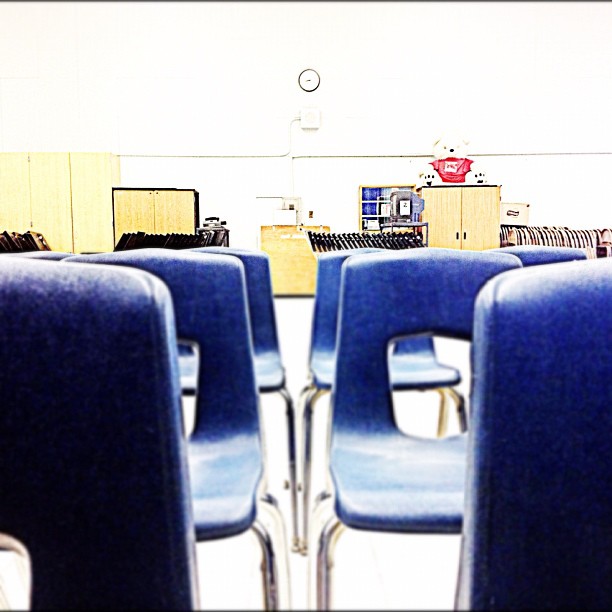
chairs in a cafeteria, which is my classroom

My teaching goal this year is to have something visual for my students for every lesson. It’s easier than ever before, since the world’s collective knowledge is in my hands (when my hands are holding an iPad). Simple enough? Yes. Easy? No. Here’s why…

I teach elementary music at three schools. If I want to use an iPad and projector for a lesson, I need to have a projector that works and I need to have a reliable internet connection. This should be simple; however, my Friday school gave me a cafeteria to teach in. The internet connection is spotty, and the projector drop is 30 feet away. This is really bad news. I finally figured out a solution. It’s taken three years of various arrangements, but it works for me, and it easy to replicate.

  1. Connect laptop to projector (30 feet away).
  2. Connect laptop to ethernet cable (30 feet away).
  3. On a Mac, go to System Preferences > Sharing > Internet Sharing
  4. Share your internet connection from ethernet to computers using Wi-Fi.
  5. On an iPad, connect to your new Wi-Fi network.
  6. Run Log Me In, or other remote control app.
  7. Control laptop from iPad.
  8. Become even more #EduAwesome.

Several problems are solved. I have a strong Wi-Fi connection, so Log Me In doesn’t quit. I have a projector that I can use because I can control my laptop from the front of my class. I don’t lose control of my class because I have to run 30 feet away to the back of the cafeteria to my laptop. Most importantly, I can confidently plan and execute better lessons.
Six Ways Shared Photo Streams Will Change Your Classroom Google Teacher Academy #gtamtv
screen3
ai, Apple, Blog, Coding, Creative Rigor, Ed Tech, EdFailFwd, Featured

How AI Helped Me Build My First Indie App — and Why Creativity Still Matters

billselak-nickprovenzano
ai, Blog, Ed Tech, Education Leadership, Featured, interview, Podcast

Supercharging Creativity: AI in Education, and Empowering Learners

Ed Tech

Rising Decline Revisited: November Tragedies [Part 18 of 18]

Featured

  • IMG_5097Navigating New Realms: AI’s Role in Shaping Educator Identities
  • IMG_4958The Educator’s Guide to AI-Powered App Development
  • IMG_4828Punk Rock and Pedagogy: Lessons in Authenticity from Blink 182

Subscribe to Podcast

Apple PodcastsAndroidby EmailRSS

Recent Posts

  • How AI Helped Me Build My First Indie App — and Why Creativity Still Matters
  • Supercharging Creativity: AI in Education, and Empowering Learners

Search

  • Featured Posts
  • Presentations
© Bill Selak 2026
Powered by WordPress • Themify WordPress Themes