Bill Selak
All That is EduAwesome
  • Podcast
    • Subscribe on Apple Podcasts
    • Subscribe on Google Play
    • Subscribe on Stitcher
    • Subscribe on Deezer
  • Blog
    • How-to
    • Editorial
    • Presentations
    • Ed Tech
    • Music
  • Rising Decline Project
    • The Rising Decline Project on Bill Selak Talks: Part 1 of 30
    • The Rising Decline Project on Bill Selak Talks: Part 2 of 30
    • The Rising Decline Project on Bill Selak Talks: Part 29 of 30
    • The Rising Decline Project on Bill Selak Talks: Part 30 of 30
  • Photography
    • Project 52
    • Photo-a-Day Year 4
    • Hollywood Photowalk 2012
    • selakphotography.com
    • Photo-a-Day older blog, with 1095 daily photos
  • Hi, I’m Bill Selak
    • Bio
    • Presentations
    • Consulting
June 7, 2011
blabberize, Presentation, teachmeet, tmnash
Like 0 Thanks! You've already liked this
Blog, Presentation, Social Media, Web 2.0

TeachMeet Nashville: Blabberize

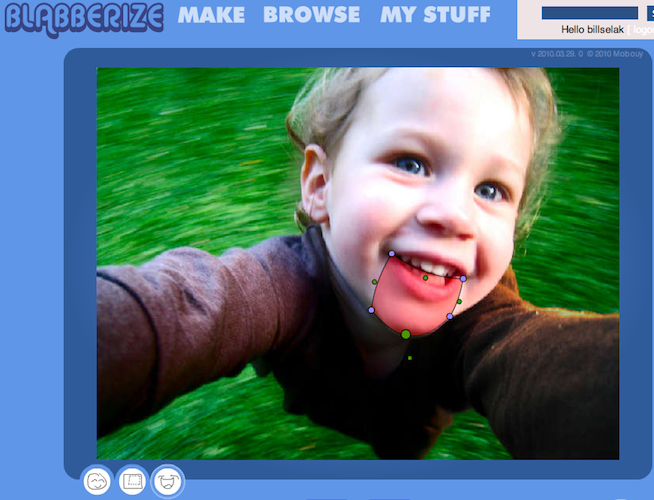
Blabberize is a simple way to make a photo look like it’s talking. Upload 
a photo, position 
a “mouth”, add a voice, and share.

If you have seen a ventriloquist, you already understand Blabberize. It’s a simple way to make a photo look like it’s talking. Upload a photo, position a “mouth”, add a voice, and share. Here’s an example:

Here are notes from my TeachMeet Presentation in Nashville about Blabberize:
View more presentations from Bill.

Here’s the workflow for using Blabberize:

1. Upload a photo to Blabberize

  • Visit http://blabberize.com/make.
  • Find a picture with a large mouth.
  • Heads directly facing the camera look better.

2. Place a mouth wireframe onto photo

  • Lasso entire lower jaw.
  • Move green dots into position first, then modify the location of the purple dots.
  • The big green dot adjusts the sensitivity for how far the jaw moves.
  • You will definitely go back and fine tune these positions.

3. Add a voice

  • Record from your microphone.
  • Louder sounds move the mouth farther.
  • Experiment with different volumes to achieve the desired effect.
  • Go back to Place Mouth and fine tune positions.

4. Share

  • Click save.
  • “I want this on video” saves it as a movie.
  • Embed the video.
  • Link to the video.

Examples

  • Return Library Books
  • Scary riddle
  • George Washington

Sharing: Hosting Options

Once you record your content, you need to upload it. SchoolTube requires a teacher’s email address, but it is rarely blocked by districts.

  • SchoolTube
  • YouTube
  • Self-hosted
  • Viddler
  • Vimeo
  • TeacherTube

Integrate into the Classroom

  • Fluency/prosody practice
  • Digital storytelling
  • Explain a concept to other students
  • Introduce your project online with Blabberize
  • Use Blabbers as assessments
  • Transform a written story into a movie/Blabber
  • Book reviews or recommendations
  • Sharing opinions
  • Project reflections
Organizing an EdCamp, Part 1 TeachMeet Nashville: Instantly Usable Video
DudeWheresMyiPad
ai, Blog, Coding, Ed Tech, Featured, Hillbrook, Podcast

Dude, Where’s My iPad? Bill Selak Talks… About Custom macOS App to Solve School Inventory Location

screen3
ai, Apple, Blog, Coding, Creative Rigor, Ed Tech, EdFailFwd, Featured

How AI Helped Me Build My First Indie App — and Why Creativity Still Matters

billselak-nickprovenzano
ai, Blog, Ed Tech, Education Leadership, Featured, interview, Podcast

Supercharging Creativity: AI in Education, and Empowering Learners

Featured

  • IMG_5097Navigating New Realms: AI’s Role in Shaping Educator Identities
  • IMG_4958The Educator’s Guide to AI-Powered App Development
  • IMG_4828Punk Rock and Pedagogy: Lessons in Authenticity from Blink 182

Subscribe to Podcast

Apple PodcastsAndroidby EmailRSS

Recent Posts

  • Dude, Where’s My iPad? Bill Selak Talks… About Custom macOS App to Solve School Inventory Location
  • Bill Selak Talks About Streamlining School Productions: The Power of OSC and QLab

Search

  • Featured Posts
  • Presentations
© Bill Selak 2026
Powered by WordPress • Themify WordPress Themes