Bill Selak
All That is EduAwesome
  • Podcast
    • Subscribe on Apple Podcasts
    • Subscribe on Google Play
    • Subscribe on Stitcher
    • Subscribe on Deezer
  • Blog
    • How-to
    • Editorial
    • Presentations
    • Ed Tech
    • Music
  • Rising Decline Project
    • The Rising Decline Project on Bill Selak Talks: Part 1 of 30
    • The Rising Decline Project on Bill Selak Talks: Part 2 of 30
    • The Rising Decline Project on Bill Selak Talks: Part 29 of 30
    • The Rising Decline Project on Bill Selak Talks: Part 30 of 30
  • Photography
    • Project 52
    • Photo-a-Day Year 4
    • Hollywood Photowalk 2012
    • selakphotography.com
    • Photo-a-Day older blog, with 1095 daily photos
  • Hi, I’m Bill Selak
    • Bio
    • Presentations
    • Consulting
June 13, 2009
applescript workmenu Word howto
Like 0 Thanks! You've already liked this
Apple, Blog, How-to

The Infamous Work Menu in Word (and how to remove files from it (on Macs))

Attention: This post is only for Apple people. Sorry, PCs.

I love using the Work menu in Microsoft Word. It lets me quickly access files that I am working on (obviously).

How to Add to Work Menu:

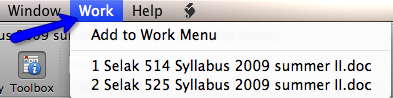
Open your file. Go to Work > Add to Work Menu. Beyond easy.

How to Remove From Work Menu:

In Word, this is really hard. Use the applescript RemoveWork. Download it , and place it here: username/Documents/Microsoft User Data/Word Script Menu Items.

Now, open the applescript. It looks like this:
Click on what you want to delete. Click delete. Done!
Permalinks on WordPress Video: I Am A Geek
DudeWheresMyiPad
ai, Blog, Coding, Ed Tech, Featured, Hillbrook, Podcast

Dude, Where’s My iPad? Bill Selak Talks… About Custom macOS App to Solve School Inventory Location

screen3
ai, Apple, Blog, Coding, Creative Rigor, Ed Tech, EdFailFwd, Featured

How AI Helped Me Build My First Indie App — and Why Creativity Still Matters

billselak-nickprovenzano
ai, Blog, Ed Tech, Education Leadership, Featured, interview, Podcast

Supercharging Creativity: AI in Education, and Empowering Learners

Featured

  • IMG_5097Navigating New Realms: AI’s Role in Shaping Educator Identities
  • IMG_4958The Educator’s Guide to AI-Powered App Development
  • IMG_4828Punk Rock and Pedagogy: Lessons in Authenticity from Blink 182

Subscribe to Podcast

Apple PodcastsAndroidby EmailRSS

Recent Posts

  • Dude, Where’s My iPad? Bill Selak Talks… About Custom macOS App to Solve School Inventory Location
  • Bill Selak Talks About Streamlining School Productions: The Power of OSC and QLab

Search

  • Featured Posts
  • Presentations
© Bill Selak 2026
Powered by WordPress • Themify WordPress Themes